Balloon Pop
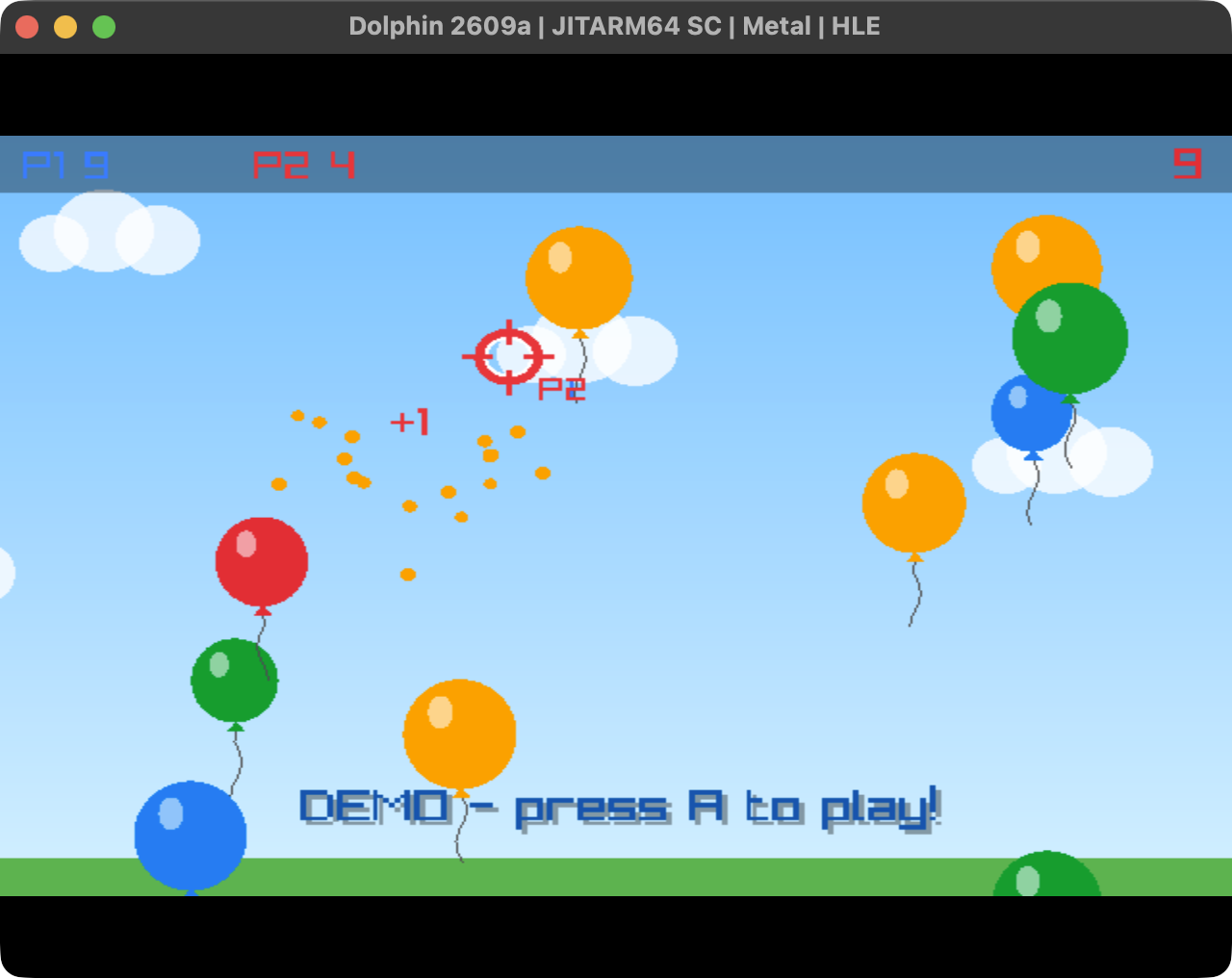
Our first game for the kids. Balloons float up from the grass, you point the Wiimote at the TV and press A to pop them, and every pop gives a little rumble. Gold balloons are faster and smaller, and they're worth 5.
How to play
- Start Balloon Pop from the Homebrew Channel.
- Everyone who wants to play points at the TV and presses A. The first press starts a 3-2-1 countdown, and anyone else can still join by pressing A before it ends. Up to four players, each with their own coloured pointer: blue, red, green, yellow.
- Pop as many balloons as you can in 60 seconds. A or B pops whatever is under your pointer.
- The results screen shows everyone's score and the winner. Press A to go back to the title.
HOME quits back to the Homebrew Channel at any time.
If nobody touches anything on the title screen for 8 seconds, two robot players put on a 20-second demo. Pressing A stops it.
Playing it on the Mac first
jolt play:balloons
This opens the game in Dolphin. Dolphin's emulated Wiimote follows the Mac's mouse: the pointer goes where the mouse is, left click is A, right click is B, and Return is HOME. Those are Dolphin's own defaults, written out by the play profile in scripts/dolphin-auto-wiimote. A person hasn't played a round this way yet (the scripted test below has), so if the pointer doesn't show up, Dolphin's controller settings are the first place to look.
Putting it on the Wii
jolt build:balloons
jolt sd
Then copy build/sd/apps/balloons/ to apps/balloons/ on the SD card or USB drive. The Wii needs its sensor bar connected for pointing, the same as any pointer game.
How it's built
The game is two halves, so the rules can be tested on the Mac.
examples/balloons/game.chas the rules and nothing else: balloons, spawning, scoring, the title → countdown → play → results flow, the demo robots, confetti. It doesn't include raylib or any Wii header.jolt testcompiles it with the Mac'sccand runs 45 checks fromexamples/balloons/test/test_game.c: joining, popping, gold scoring, the round timer, ties, the results-screen lock, and the demo.examples/balloons/main.cis the Wii half: reading the Wiimotes, drawing with raylib, rumble, and a one-line event log.
The screens
Balloon Pop and Star Catcher share this flow. game_update moves between the modes, and main.c logs each change as mode <name>, which is what jolt verify reads.
stateDiagram-v2
  [*] --> Title
  Title --> Countdown: someone presses A
  Title --> Demo: 8 s with no press
  Demo --> Title: any press, or after 20 s
  Countdown --> Play: after 3 s (others can still join)
  Play --> Results: after 60 s
  Results --> Title: A, once the 2 s lock is over
Wiimote input
The game reads the remotes through examples/common/wiimote.c, shared with the other games, rather than through SDL, which merges every remote's pointer into one mouse. Wiimote input covers the module. Balloon Pop uses three things from it: ir_valid, ir_x, ir_y for the pointer, A or B in pressed to pop, and wiimote_rumble for an eighth of a second per pop (a quarter for gold).
The bug the first test missed: SDL's own main
The first version of this game passed every check and would have done nothing on the Wii. The checks only watched the robot demo, and the robots never touch a remote.
devkitPro's SDL for the Wii runs its own main (SDL_wii_main.c) before the app's. That wrapper calls WPAD_Init(), hooks the power and reset buttons, and mounts the SD card, then calls the app's code as SDL_main. A raylib app defines a plain main, so the wrapper was never linked, and WPAD_Probe answered WPAD_ERR_NO_CONTROLLER for every remote. The fix is SDL's usual convention, one include at the top of main.c:
#include <SDL2/SDL_main.h>   // our main() becomes SDL_main; SDL's main runs first
int main(int argc, char *argv[])
examples/hello had the same problem, which is why it only ever reported a GameCube pad.
Checking it without anyone holding a Wiimote
jolt verify plays Balloon Pop twice in Dolphin, both times with MMU emulation on.
The robot demo. Boot, wait 20 seconds, and require balloons: mode demo followed by at least three pops. That covers drawing, the game loop and the rules.
A scripted Wiimote (jolt run:balloons-wiimote). The pointer profile of scripts/dolphin-auto-wiimote makes Dolphin's emulated Wiimote 1 play by itself:
Buttons/A = timer(0.25)                         ; press A four times a second
IR/Right = sin(timer(5) * 6.2832) * 0.6         ; sweep the pointer left
IR/Left = 0 - sin(timer(5) * 6.2832) * 0.6      ; and right across the middle
The check requires the remote to join (mode countdown), the round to start (mode play), and player 1 to pop at least one balloon during play. That covers the WPAD path end to end: SDL's WPAD_Init, the IR pointer, A-press detection and scoring. It doesn't touch the Mac's real mouse.
One early run popped nothing at all. We blamed the pointer sweep at the time, which also went up and down then, and kept it at mid-height after that. The real cause was more likely the one Shake Race found later: Dolphin ignores input while its window isn't focused, which dolphin-shot now turns off. See Wiimote input.
What only the console can tell us: whether the real sensor bar and remotes behave like Dolphin's, whether the rumble feels right, and whether four remotes at once each keep their own pointer.
An open question: one hang at boot
In one jolt verify run, right after the switch to SDL's main, the game stopped during raylib's start-up, just before SDL's video init, and never opened a window. It didn't happen again in the next eight boots. SDL's wrapper now also reloads IOS and mounts the SD card at start-up, which is new work that could be involved, but nothing has shown that yet. Watch for a black screen on the first hardware runs.
Ideas for next time
- Sound: a pop, a countdown beep, a fanfare. libogc has ASND for this.
- Shake the Wiimote to pop every balloon near your pointer, once per round.
- Balloons the kids draw themselves, loaded from the SD card.
- A two-team mode for when four people are playing.